
How Our Reading Hub Meets Your Child Where They Are

SocialDiverse Admin
Published · 4 min read
266 views
0 likes
0 comments
0 shares

## Does your child find digital reading apps overwhelming?
For many neurodivergent children — including those with ADHD, autism, or dyslexia — standard reading tools create a wall of sensory noise that makes comprehension feel like a chore.
Our **Activity Hub** was built to tear that wall down. By using the evidence-based **FEDIS+R framework**, we’ve designed a digital environment that respects your child’s pace and sensory needs, turning reading into a moment of connection rather than stress.
---
## What Makes Our Hub Different?
### 🔊 Narration with “Slowness Control”
Processing speech at a standard speed can be exhausting for some learners. Our **Read Out Loud** feature was designed with one question: *What if the story waited for the child, instead of the other way around?*
- **Speed Control** — Easily slow down the narration to a pace that fits your child’s processing speed.
- **Warm Tones** — We use soothing, human-like voices (never robotic!) to keep the environment psychologically safe.
- **Think-Time Pauses** — Built-in 0.5-second gaps between sentences give the brain the space it needs to anchor new information.
- **Voice Choice** — Parents can pick their child’s preferred voice from Activity Hub Settings and preview it before saving.
### ✅ Interactive Q&A (Success Without the Pressure)
Traditional “quizzes” often trigger performance anxiety. We’ve replaced high-pressure testing with a collaborative, choice-based experience:
- **Visual Options** — Instead of a wall of text, children can select images to answer prompts, making the activity accessible for non-verbal or early readers.
- **Declarative Learning** — We don’t ask “What is the answer?” Instead, we share observations like, *“I noticed the water rose. I wonder if the crow can drink now?”* This invites the child into the story rather than putting them on the spot.
- **Voice Input** — A microphone button lets children answer out loud using speech recognition — meeting kids where their communication style is.
- **Gentle Feedback** — No red X marks. Every response gets encouragement, and the child can always try again.
### 🧘 Distraction-Free Reading Environment
We know that a notification badge or a busy header can pull a neurodivergent child out of focus in an instant.
- **Everything hides** — Chat widgets, notification badges, and floating buttons are automatically removed during reading. The screen becomes *just the story*.
- **Clean page layout** — One illustration, one sentence, one focus point. No sidebars, no ads, no visual clutter.
- **Progress indicator** — A gentle progress bar shows how far along the story is — without the anxiety of “page 3 of 12.”
---
## A Glimpse Inside: “The Clever Crow”
Our signature story uses **Compression Reading** — sentences are strictly **8 to 10 words** long and written in the **active voice** to minimize cognitive load.

**Page 1:** *A black crow was very thirsty in the sun.*
**Visual Strategy:** Soft colours and a simple hierarchy help the child focus on the “Character” and the “Setting” immediately.

**Page 3:** *The clear water was at the bottom of the pitcher.*
**Visual Strategy:** We use a **clear glass pitcher** to provide immediate, concrete feedback. Seeing the “problem” through the glass helps children understand cause-and-effect without guessing.
---
## Customisable Settings — You’re in Control
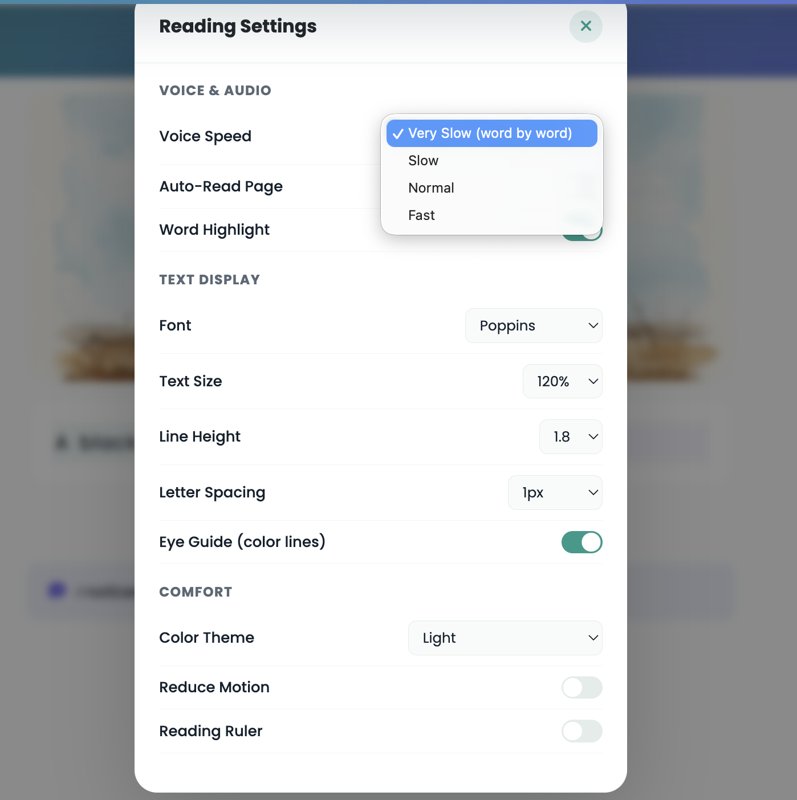
From the **Reading Settings** panel, parents and caregivers can fine-tune every aspect of the experience:
**Voice & Audio**
- **Voice Speed** — Very Slow (word by word), Slow, Normal, or Fast
- **Auto-Read Page** — Toggle automatic narration on or off
- **Word Highlight** — Follow along as each word is spoken
**Text Display**
- **Font** — Choose from Poppins, OpenDyslexic, and more
- **Text Size** — Scale from 80% to 200%
- **Line Height & Letter Spacing** — Fine-tune for readability
- **Eye Guide (colour lines)** — Alternating line colours to help track text
**Comfort**
- **Colour Theme** — Light, Dark, Sepia, or High Contrast
- **Reduce Motion** — Disable animations for sensory-sensitive readers
- **Reading Ruler** — A movable highlight bar to focus on one line at a time
All settings are saved per-child and persist across sessions.
---
## Features at a Glance
| Feature | Why It Matters |
|---|---|
| Speed control (Very Slow to Fast) | Matches your child’s processing pace |
| Natural voice narration | Familiar and warm, not robotic |
| Image-based Q&A | Accessible for non-verbal and early readers |
| Voice input (microphone) | Lets children answer by speaking |
| Distraction-free mode | Hides all widgets automatically |
| 8–10 word compressed sentences | Reduces cognitive overload |
| OpenDyslexic font option | Designed for dyslexic readers |
| Eye guide & reading ruler | Helps track text line by line |
| Colour themes (Light/Dark/Sepia) | Reduces visual strain |
| No timers, no scores, no red marks | Removes performance anxiety |
---
## Who Is This For?
- **Parents & caregivers** of children aged 3–10 with ADHD, autism, dyslexia, or speech delays
- **Special educators** looking for supplementary reading tools
- **Therapists** who want low-stimulation digital activities for sessions
- **Any child** who finds standard reading apps too fast or too noisy
---
## Ready to Unlock Your Child’s Potential?
Our Activity Hub is more than a reading tool — it’s a space where every mind is seen and supported. By changing *how* information is presented, we empower your child to focus on the joy of the story.
**[Try the Reading Activity →](https://socialdiverse.com/activities/reading-comprehension/)**
*Every mind deserves a story told at their pace.*
You're exploring something meaningful
Join India's neurodiversity community to read the full article, connect with experts, and access resources that make a difference.
Free forever — no credit card needed
Already a member?
Log in to continue reading

0 Comments
Join the conversation
Share your thoughts — log in or create an account to comment.